> ## Documentation Index
> Fetch the complete documentation index at: https://guide.pane.studio/llms.txt
> Use this file to discover all available pages before exploring further.
# System requirements
> Check the minimum requirements for running Pane Studio on Windows.
## Minimum requirements
For the best experience, your PC should meet these minimum requirements:
* Operating system: Windows 10 (19H1) or later, including Windows 11
* Processor: 4-core CPU minimum
* Graphics: Hardware acceleration is currently supported on Intel integrated GPUs
* Storage: SSD recommended
* Memory: 8 GB RAM minimum
Recording performance can vary based on your project and capture settings.
## Check your PC specifications
To verify your system details:
1. Click the Windows Start button.
2. Open **Settings**.
3. Select **System**.
4. Click **About**.
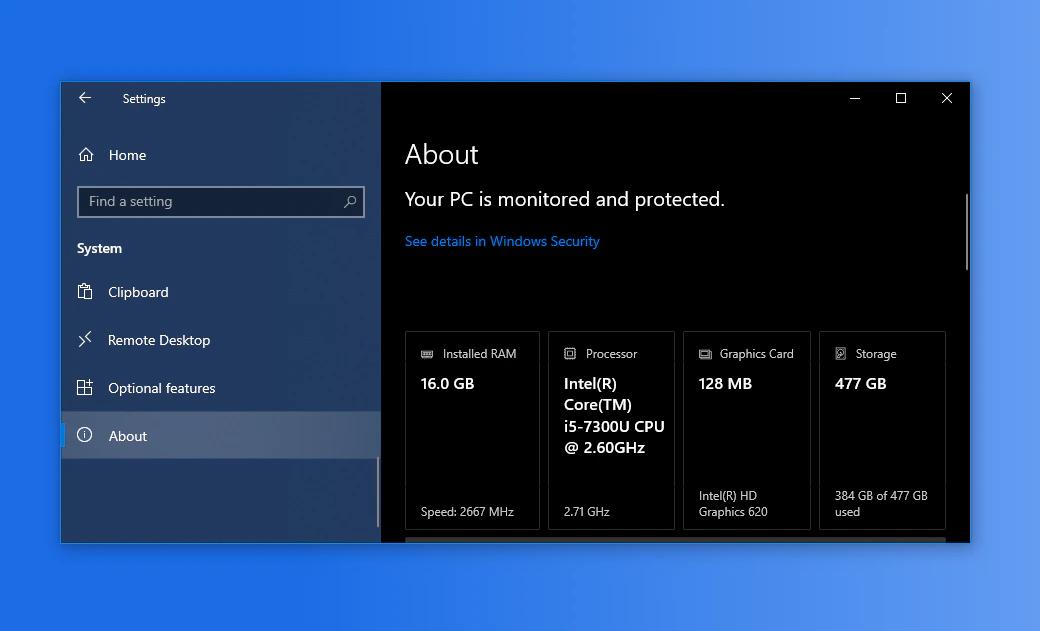 Review these values:
* Windows version
* Processor
* Installed RAM
If your PC meets these requirements, you are ready to install and use Pane Studio.
Review these values:
* Windows version
* Processor
* Installed RAM
If your PC meets these requirements, you are ready to install and use Pane Studio.